Guides
Desktop App Usage
Use the Tauri desktop app for local refresh, filtering, config, session drill-down, and export.
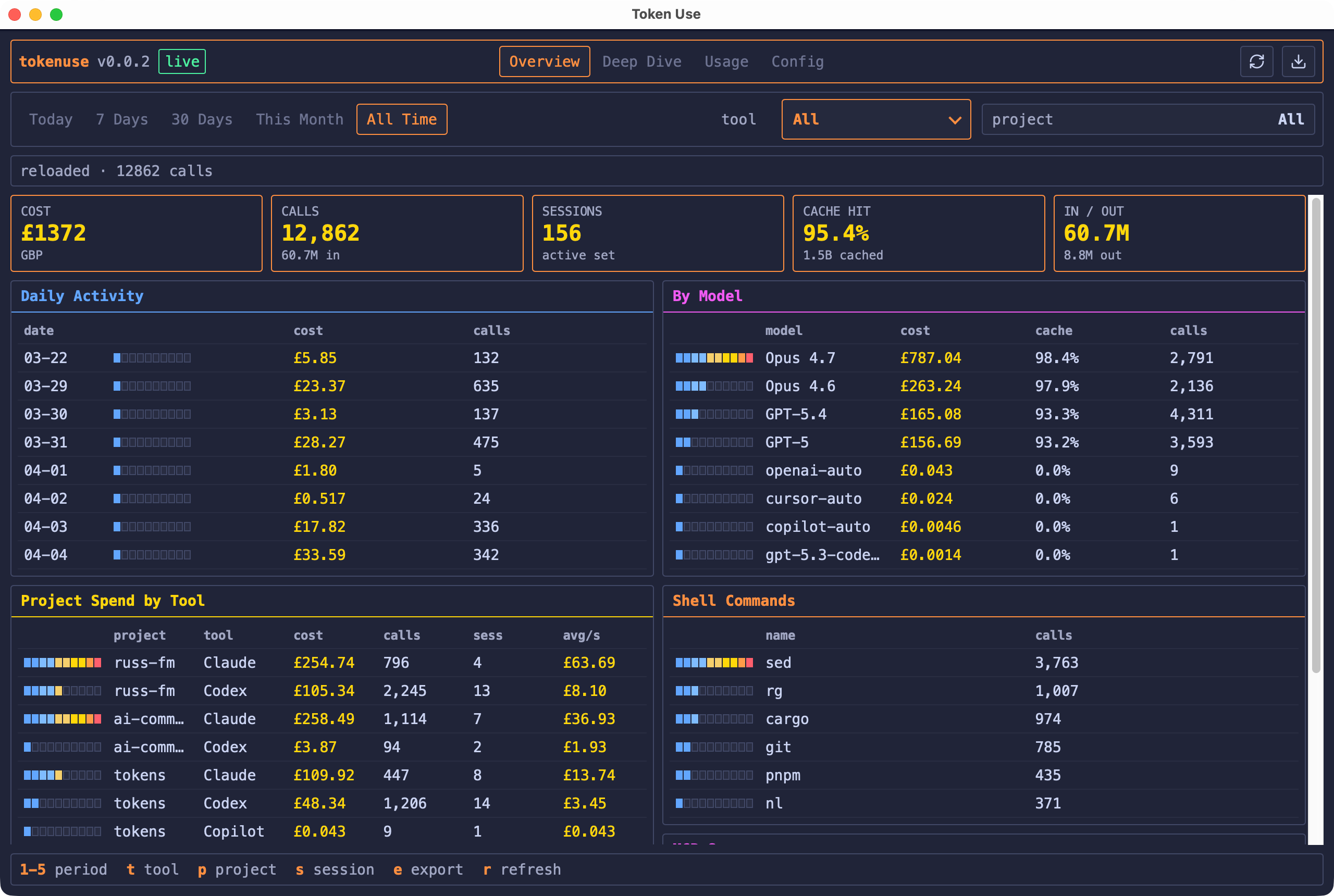
Desktop App Usage
The desktop app is a Tauri v2 + Svelte frontend over the same Rust core as the TUI. It shares the local archive, config, currency, pricing, refresh, session drill-down, and export logic.
Install And Open
Install on macOS with Homebrew Cask:
brew install --cask russmckendrick/tap/tokenuse
open -a "Token Use"
The macOS desktop app also ships as a signed and notarized universal DMG. Linux desktop builds are published as unsigned AppImage, deb, and rpm assets for AMD64 and ARM64. Windows desktop builds are published as unsigned AMD64 NSIS and MSI installers. Verify the matching .sha256 file before running or installing unsigned assets.
Main Tabs
- Overview: KPIs, daily activity, model spend, project spend, and common commands.
- Deep Dive: denser tables for projects, sessions, models, tools, commands, and MCP servers.
- Session: per-call session drill-down with clickable rows for full stored prompt, tool, command, and token metadata.
- Usage: rolling 24-hour per-tool activity with Codex limit snapshots when available.
- Config: currency selection and confirmed local downloads for currency and pricing snapshots.
The desktop header mirrors the TUI filters: period, tool, sort mode, and project. Sort mode can be changed from the header or with g, and cycles between spend, latest date, and token use. The app polls snapshots in the background so completed refreshes appear without blocking the UI.
Dashboard sections render the full sorted row set. Sections with more rows than fit in the current window scroll inside the section so the header, filters, and footer remain visible.
Refresh
Use the refresh button or keyboard shortcut r to sync the archive. Refreshes use the same background archive refresher as the TUI and keep the previous data visible if a sync fails.
Project, Session, Currency, And Export Pickers
The desktop app uses native dialogs where that makes sense:
- Project and session pickers include search.
- Session call rows open a detail modal with
Enter,Space, or a mouse click. - Currency selection writes the same
config.jsonsetting used by the TUI. - Export format selection writes JSON, CSV, SVG, or PNG from the current filtered view.
- Folder selection uses the Tauri dialog plugin and is runtime-only, matching TUI behavior.
Shared Local Data
The desktop app and TUI share the platform config directory under tokenuse:
| File / directory | Shared purpose |
|---|---|
config.json | User overrides, currently display currency |
archive.db | Durable local usage archive |
rates.json | Optional local currency snapshot |
pricing-snapshot.json | Optional local LiteLLM-derived pricing snapshot |
exports/ | Fallback export directory |
Changing currency, refreshing the archive, or downloading local rates/pricing from the desktop app affects the same data the TUI reads.